

If you’ve ever tried to learn a song by ear, you know the drill: pause, rewind, guess a chord, play it back, get it wrong, repeat. I built an app that skips most of that. Upload an MP3, m4a, or mp4 of a song and it analyzes the beat, bars, and chords for you, then hands you a chord sheet or TAB you can actually play along with.
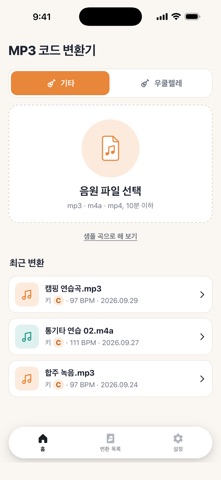
I built this because I kept recording covers and jam sessions on my phone and had no fast way to figure out what I’d actually played, or to turn someone else’s recording into something I could practice with. The app, originally named MP3 기타 · 우쿨렐레 코드 변환기 in Korean, started as a tool for my own practice sessions before it became something I wanted other guitar and ukulele players to have. It launched on Android first, and this iOS release brings the same tool to the App Store.
What it does
- Upload an mp3, m4a, or mp4 file up to 10 minutes long, pick guitar or ukulele, and it analyzes tempo, bars, and chords. The audio is deleted from the server right after analysis.
- Get a chord sheet with four bars per line and chord changes marked every half bar, plus fingering diagrams for every chord in the song, with an easy-chord option alongside the original chords.
- Switch to TAB view: six strings for guitar, four for ukulele, with a choice between arpeggio and strum patterns, strum direction included.
- Play along with a generated backing track synced to the chord sheet or TAB, mix in your own recording, slow playback down to 0.75x or 0.5x, and see the current chord highlighted as it plays.
- Adjust capo position, transpose the key up or down, and tap any chord the analysis got wrong to fix it. Chords the engine wasn’t confident about are marked with a dot.

Every song you convert stays in a list inside the app, so you can reopen it without uploading again. When you’re happy with a chart, export it as one long PNG image or a paginated PDF for printing.

This is for anyone who plays guitar or ukulele and wants to work from a recording instead of hunting for tabs online, especially if that recording is something nobody has transcribed: a friend’s demo, a busking set you caught on your phone, a cover with a chord progression you can’t quite place by ear. It’s also useful if you already read chord charts but want an easier version with a capo suggestion, or if you like practicing strumming and arpeggios against a real backing track instead of a metronome. No account or sign-in is needed, and the app supports both Korean and English.
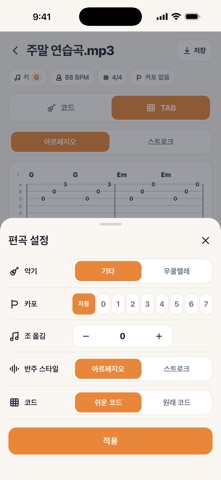
The chord detection is automatic, so it won’t be perfect on every track, which is exactly why tapping to correct a chord is built in. If you’ve been using the Android version, nothing changes except where you download it. If this is your first time hearing about it, pick a recording, choose your instrument, and see what comes out. It’s on the App Store now.