I built Keyclack because I kept reaching for a keyboard that wasn’t there. In meetings, libraries, quiet offices—anywhere I couldn’t actually type—my hands wanted something to do. I wanted the sound and feel of a real mechanical keyboard, but delivered through my phone, on demand.
The result is a typing ASMR toy that’s pure fidget and pure sound. Press a keycap on screen and your phone plays a real keystroke sample, vibrates if you want it to, and the cap sinks just enough to feel physical. It’s designed to be played with your ears as much as your hands.

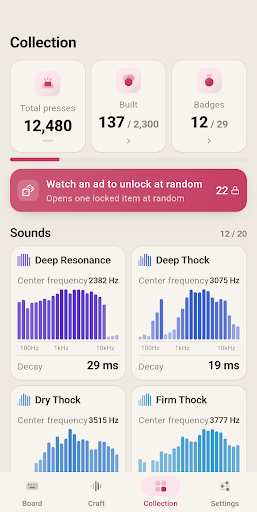
This isn’t a keyboard app—it never replaces your system keyboard or sees anything you type. It’s a standalone toy that works completely offline. I sampled twenty typing sounds from different mechanical keyboards and analyzed their acoustic properties. Instead of marketing names, I named them by their actual measured timbre: Thock, Clack, Click, Ring, Tail. Deep Resonance sits at 2382 Hz with a 29.3 ms decay. Firm Click is sharp and short at 8198 Hz.
What It Does
- Twenty typing sounds — sampled from real keyboards and named by measured frequency and decay, not trademarks
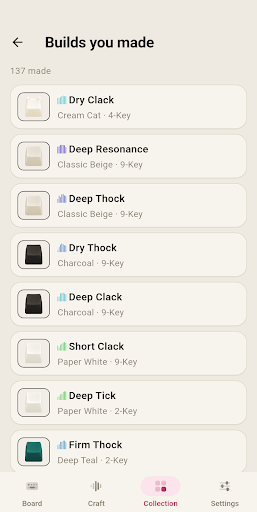
- Twenty keycap colorways — Classic Beige, Deep Teal, Moss, Rose, Sky, and more, with matte, glossy, and translucent finishes
- Five cluster sizes — 1, 2, 4, 9, or 16 caps. The fewer caps, the larger each one. A single cap fills your screen; 16 sit in a grid
- 2,000 combinations — pick your sound, keycap set, and cluster size in the Craft tab, preview the result, and commit to your collection
- 29 badges to collect — track total presses, daily streaks, longest runs, and full sweeps of each sound and colorway. Play at 3 a.m. and earn Night Owl; play at dawn and get Early Bird
- Full customization — adjust volume, haptic strength (off, light, medium, strong), and the key-up sound. Light and dark themes. English and Korean. Export and restore your entire collection
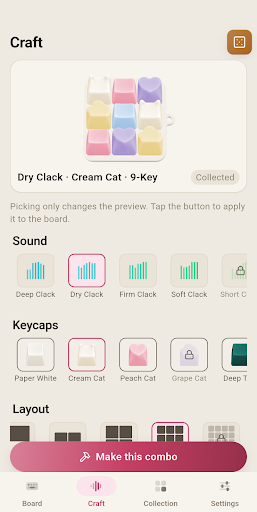
Each cluster has one hero cap in a contrasting color. On the 16-cap board, that hero cap plays a deeper, stabilizer-weighted sample—the way a bigger key sounds on a real mechanical keyboard. Repeat the same key and the app rotates through alternate samples with slight pitch jitter, so it never feels like you’re listening to the same recording on loop.
I built this for anyone who loves keyboard ASMR, anyone whose hands get restless without something to press, keycap keyring collectors, custom keyboard enthusiasts, or anyone winding down with calm background noise before sleep. If you’re stuck somewhere you can’t type—a meeting, a library, a quiet office—this is for you. Every sound was built from CC0 public-domain audio, verified and acoustically measured to hold a single keystroke.
Keyclack is now available on Google Play. Download it free, no account required, no sign-in, fully offline. Go press a keycap.