If you’ve tried learning Saju or BaZi from books and videos, you’ve probably hit the same wall: older chart apps are cluttered, confusing, and force you to search the web every time an unfamiliar term appears. I built Four Pillars to fix that.
I started this project because I was frustrated too. I’d open a chart app, see a term like “Hurting Officer” or “Rob Wealth,” and have to leave the app, search online, lose my place, and come back. I wanted something that treated the chart as a learning tool, not just a display. So I built an app that lets you tap any character or term on screen and get a plain-language explanation in seconds.
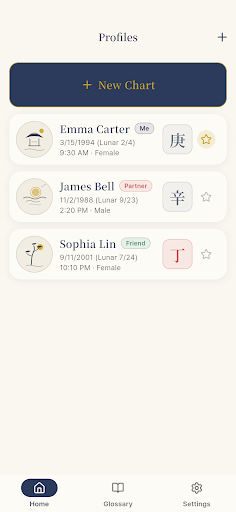
The app works offline, stores everything on your phone (no sign-up required), and supports both Korean and English. Whether you’re a beginner or someone who’s read dozens of charts, the layout stays clean and readable.
What it does
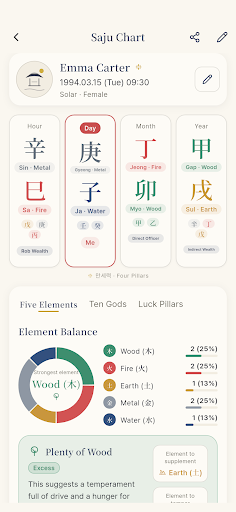
- Draw your Four Pillars chart — Enter your birth date and time (or just the date if the hour is unknown), and the app lays out your year, month, day and hour pillars with all their heavenly stems, earthly branches, hidden stems and ten gods on one screen. Your Day Master is highlighted, and every character is colour coded by its element: Wood, Fire, Earth, Metal or Water.
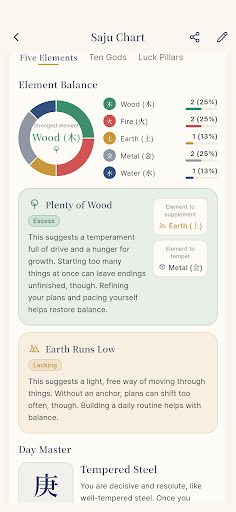
- Show your element balance — A donut chart and percentages tell you how the five elements are distributed in your chart, which energy runs strong, which is missing, and which would help balance it. A profile card describes the temperament tied to your day stem.
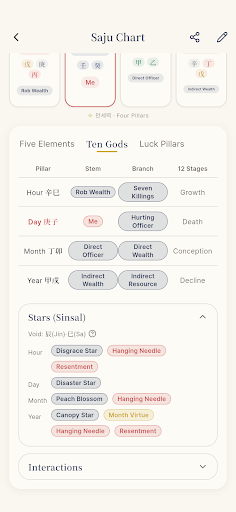
- List ten gods, life stages and stars — A table shows all ten gods and twelve life stages for each pillar, plus major stars like Nobleman, Travel, Peach Blossom and Canopy. Branch interactions (six harmony, trine, clash, punishment, break and harm) are included too.
- Calculate luck pillars and yearly trends — See your luck-pillar start age and direction, then decade pillars with ages and years. Check yearly luck around the present year and monthly luck for this year. Tap any cell to open the ten god and life stage for that period.
- Explain every term instantly — Every term badge on the chart opens a three-sentence plain-language explanation with balancing notes and related links. A searchable Glossary lets you browse by category: ten gods, stems, branches, elements, life stages, stars and core concepts.
- Save and compare charts — Store charts for yourself, a partner, friends, family or colleagues with relation tags. See each person’s Day Master at a glance, and keep favourites pinned at the top.
- Share your chart — Export as a card image for any messenger, or copy the full chart as text to paste into an AI assistant for a longer interpretation.
Why the calculation matters
Different Saju apps sometimes disagree on the same person’s chart. I built transparency into Four Pillars from the start. Solar-term boundaries follow Korea Astronomy and Space Science Institute data to the minute, and lunar conversion uses the Korean standard. Late Rat Hour handling, daylight-saving correction, and longitude adjustment between 135°E and Seoul can each be toggled on or off in settings — so you can see exactly what changes your chart when you adjust them.
Who this is for
This app is built for anyone serious about learning Saju or BaZi. If you’ve been frustrated by cluttered chart apps, if you’ve had to abandon your app and search the web every time a new term appeared, or if you wanted to save and compare charts for multiple people, this is for you. It’s also useful if you’ve noticed different apps giving different charts for the same person — now you can see which settings are causing the difference and understand why.
Four Pillars is available now on Google Play. No sign-up, no ads, no server dependency — everything runs on your phone and works in airplane mode. Download it free and start reading your chart.