
You remember an appointment right after you hang up the phone, or mid-drive, or while washing dishes with wet hands. By the time you open your calendar app, you’re tapping through date pickers and time wheels just to log one sentence worth of information.
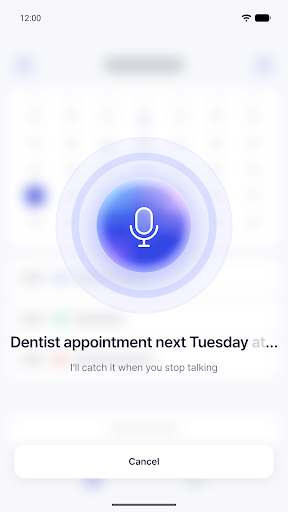
I built Voice Calendar because that gap between remembering and recording kept costing me the appointment itself. The idea is simple: say the sentence the way you’d say it to a friend, and let the app figure out the title, date and time. Tap the mic, talk, and a confirm card shows up with everything filled in. If it’s right, save it. If something’s off, you fix just that one field instead of retyping the whole thing.

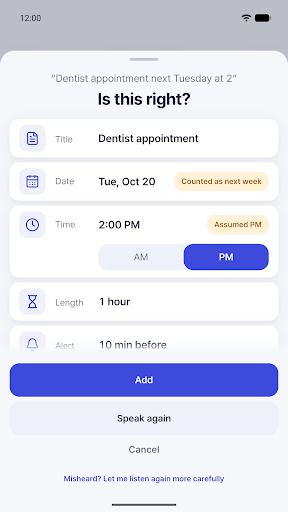
The harder problem was making the guessing trustworthy. Dates and times in casual speech are messy — “next Tuesday,” “at 2,” “the day after tomorrow” — so I built the parsing on explicit date-time rules rather than letting the model freehand it. That means “next Tuesday” never quietly drifts to the wrong day, and any field the app had to guess gets a small tag like “Assumed p.m.” so you know exactly what to double check.
Features
- One mic button, live captions: say date, time and repetition in one go, like “Pilates every Tuesday at 7,” and watch it transcribe as you speak.
- Only the guesses get flagged: no date mentioned means it uses today, an ambiguous “at 2” skips to the next time it could mean, and every assumption carries a visible tag instead of hiding in the background.
- One card to fix everything: title, date, time, duration, location, repeat, reminder and target calendar all sit on the same card, and it flags it if your stated date and weekday don’t actually match.
- Saves to the calendar you already use: events go straight into Google Calendar or Samsung Calendar on your phone, reminders fire the normal way, and a one-tap Undo is there right after you save.
- Type instead of talk: in a quiet room, type the same sentence and get the identical confirm card.
- Month view and history: browse the month, tap a day to add or review events, and check your voice-logged streaks, edit rate and busiest times from the history tab, which exports and imports locally.
Voice Calendar is for anyone who thinks of a plan out loud before they have a free hand to type it in — parents juggling school runs and doctor visits, students stacking classes and study sessions, and professionals going from one client call straight into the next. If you already live in Google Calendar or Samsung Calendar and don’t want to switch tools just to get voice input, this sits on top of what you have instead of replacing it.
It’s also built to stay light. There’s no sign-up or login, your events live only in your phone’s own calendar, and the only thing sent to the server for parsing is the sentence itself as text — never stored beyond a short duplicate-request check that clears out in ten minutes. The app works in both English and Korean.

Voice parsing is free every day, with a short ad to top up once you run out, or a Premium subscription for unlimited parses with no ads, cancelable anytime from Google Play. If you’ve ever lost an appointment in the gap between remembering it and writing it down, give Voice Calendar a try on Android.