

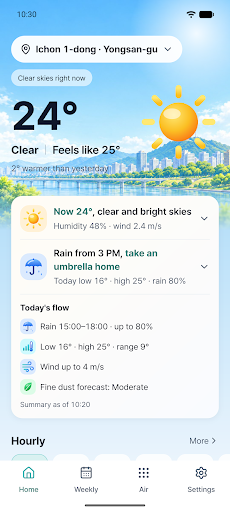
Most weather apps hand you a table of numbers — temperature, rain percentage, wind speed, dust readings — and leave you to do the math. WeatherWise does that math for you. It reads the data and gives you two lines: what the sky is doing right now, and how the rest of the day plays out.

I built this because I was tired of opening two apps every morning, one for weather and one for air quality, then mentally combining them to decide whether I needed an umbrella or a mask. In Seoul, both rain and fine dust can turn bad fast, and I wanted one glance to tell me what to actually do, not just what the numbers were. So I built the glance.
What it does
- A summary card on Home combines temperature, rain, fine dust and wind into two lines. You can rank which of those four matters most to you, and the summary leads with that — though weather warnings and sudden changes always jump to the front.
- Server-sent push alerts for rain starting within the hour (60% chance or higher), fine dust spikes rated “Bad” or worse, official heavy rain, heat wave or cold wave warnings, and an optional morning brief at a time and on the days you choose. They arrive even when the app is closed, and each type can be toggled independently.
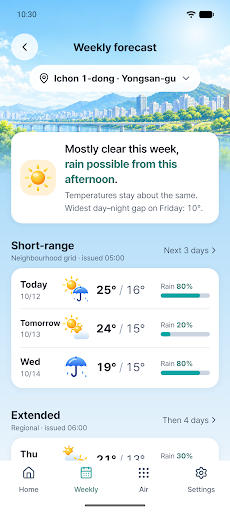
- An hourly forecast with feels-like temperature, humidity and wind, plus a weekly view that keeps the neighborhood-level short-range forecast separate from the province-level extended forecast, with timestamps for each.
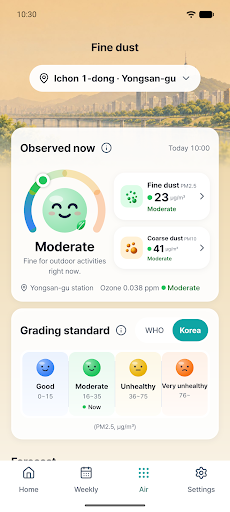
- Air quality broken into three distinct layers — observed station readings, the recent trend at that station, and AirKorea’s regional forecast — never blended together, with a choice between Korea’s national 4-level grading or the stricter WHO-based scale.
- Home screen widgets, up to 10 saved locations you can switch between with a tap, light and dark themes, and both English and Korean language support.
WeatherWise runs on public data from the Korea Meteorological Administration and AirKorea, so it’s built specifically for conditions in South Korea — coverage doesn’t extend beyond it. If you live there, commute by bus or bike, check fine dust before sending your kids to school, or just want rain and wind watched for your next run, this is built around that exact routine. If you’re abroad but following weather for family, friends, or a trip to Korea, the same two-line summary works for you too.
There’s no sign-up and no login — your saved places and settings stay on your device, and location data is only used to find your neighborhood, never stored. If you turn on alerts, only what’s needed to send them lives on our server, and it’s deleted the moment you turn alerts off.
WeatherWise: One-Line Weather is live now on Google Play. If checking the weather feels like more work than it should, give it a try.