

You download a “free” AI tool from GitHub, and the first thing it asks for is an API key. You check the README—it claims to be open source and fully local. So which is it? What It Calls answers that question by reading the actual code and showing you exactly which external APIs the tool calls.
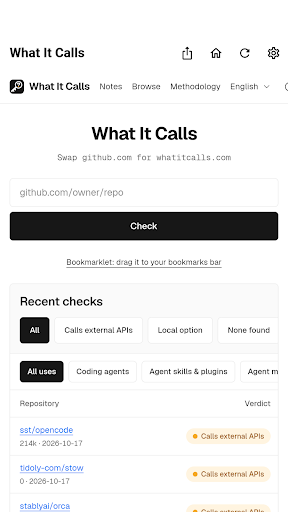
I built this because I got tired of the gap between what GitHub projects claim and what they actually do. Too many tools market themselves as local-first or free, then surprise you with API calls to third-party services. I wanted a straightforward way to see the facts before installing anything.
The idea is simple: no scores, no verdicts, no judgment. Just the lines of code that prove what the tool does and where the pricing information comes from.
How It Works
- Two ways to check: Swap
github.comforwhatitcalls.comin any repository URL, or paste the link into the app and tap Check. Already-checked repos load instantly. - Four clear states: Uses external APIs, uses external APIs with a local option available, no external APIs found, or needs review (when there’s not enough evidence to decide).
- Full transparency per repository: What works without an API key, each external API’s company and pricing source, what data leaves your machine, gaps between the README and actual code, and evidence links pinned to specific commits.
- Browse and explore: Check recently analyzed repositories, search by use case (coding agents, image/video/voice tools, document processors, and more), and see which external APIs show up most often across projects.
- Request corrections: If a result is wrong, flag it and request a correction. We review and fix the result.

Who This Is For
This app is built for anyone who’s been caught off guard by API key requests from tools that claimed to be free or local. If you’re evaluating open-source AI tools for your team and need to know exactly where data goes before adoption, or if you’re just looking for tools that genuinely run on your own machine without external calls, What It Calls gives you the facts you need to decide. No sign-up required—just check a repository and see what you find.

What It Calls is available now on Google Play for Android, with support for English and Korean. Results are generated automatically by reading public code, and the service is independent and not affiliated with GitHub.

Try it out on Google Play. Paste in a GitHub repository URL and see what it actually calls.