Ever wondered if you’re actually hitting the note you think you are? When you’re practicing alone, there’s no one to tell you whether you’re sharp, flat, or dead center. PitchVox solves that problem by turning your voice into a live visual graph, showing you exactly where your pitch sits relative to the target note—in real time.
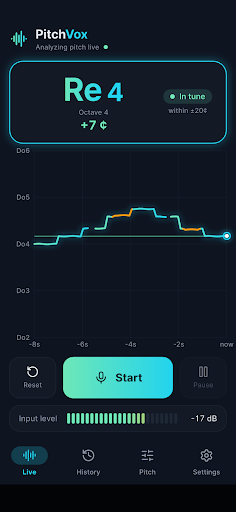
I built PitchVox because I found myself in that exact situation. I was practicing vocal covers at home and had no way to know if I was staying on pitch or gradually drifting flat. I wanted something simple: open the app, sing, and instantly see whether my pitch was landing where it should. No sign-ups, no cloud uploads, just immediate visual feedback.
The result is an app designed for anyone serious about their vocal accuracy—whether that’s a casual singer perfecting a karaoke run, a vocal student between lessons, or someone training their ear to hear and hit intervals consistently.
What It Does
- Real-time pitch graph — Sing into your mic and watch your pitch scroll across the screen as a glowing line. In-tune notes show up in lime and cyan; off-pitch moments turn amber so you can instantly see how far above or below target you are.
- Live note display — Your current note appears large on screen in your choice of solfege (Do Re Mi) or letter names (C, D, E), complete with octave and cent offset, so you always know exactly which note you’re hitting.
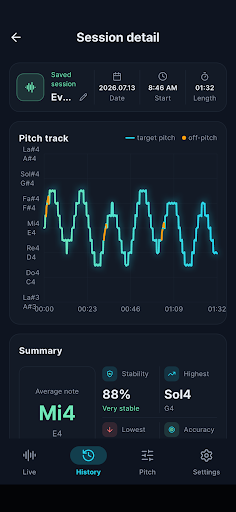
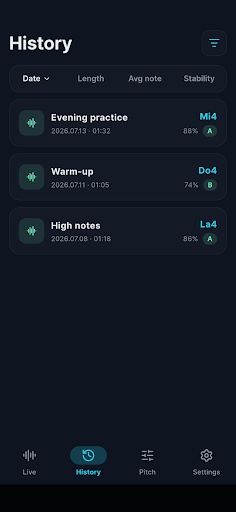
- Practice history and replay — Save a session and get a summary of your average pitch, stability, accuracy, and your highest and lowest notes. Replay the pitch trajectory to pinpoint exactly where you drifted or excelled.
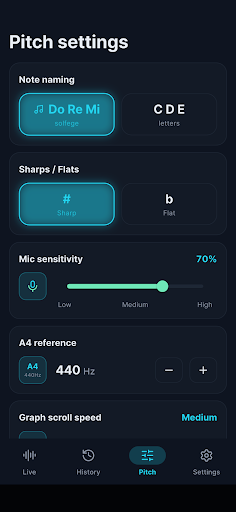
- Full customization — Switch between note naming systems, toggle sharps or flats, adjust mic sensitivity, set your A4 reference frequency, control graph speed, and choose your displayed note range.
Privacy and simplicity were non-negotiable. There’s no account to create, no data sent anywhere. Your voice is analyzed only on your device—audio is never recorded, stored, or uploaded. Your practice records and settings stay on your phone, period.
Who This Is For
PitchVox is built for singers who practice alone and need honest feedback. That includes cover singers and karaoke enthusiasts who want to know if their high notes are actually landing, vocal students working between lessons with a teacher, anyone training their ear for better pitch accuracy, and people who keep sliding flat and want to see it happening in real time. If you’ve ever felt uncertain about whether you nailed a note or blown past it, this app is for you.
PitchVox 1.0 is live on Google Play right now. Download it, open it, and start singing. Your voice deserves eyes on it.
Note: PitchVox is a practice aid and does not replace professional vocal training.
Play Store에서 다운로드: PitchVox – Vocal Pitch Monitor
Official page: reactiveworks.dev/apps/pitchvox
Update history: ahngo13.github.io
Leave a Reply