

If you ride the same Seoul subway trip every day, you already know the small daily tax it takes: open a map app, type in a station you’ve typed a hundred times before, wait for it to load, then do the math on whether you still have time to grab your bag. Subway Pins skips all of that. It opens straight to your saved trips, so you see the next train and when to leave before you’ve even sat down.
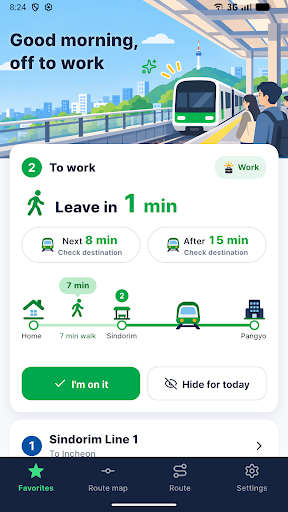
I built this for my own commute in Seoul. I was tired of re-searching the same route every morning just to find out if I had three minutes or thirteen, and I wanted something that filtered out the noise — trains going the wrong way, ones that end short of my stop, express trains that skip it entirely. Once I had that working for myself, it made sense to put it on Google Play for anyone else doing the same commute.
Features
- Saved trips — save a full origin-to-destination trip exactly as you picked it, including via stations and route type, or save a single station with your walking time added in.
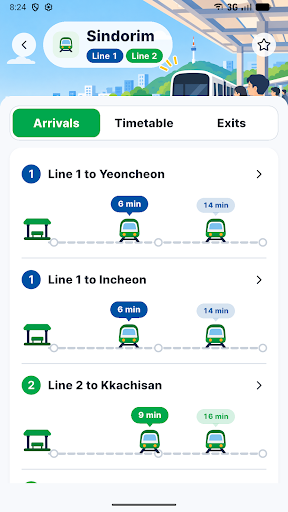
- Arrival times based on public data — see the next train and the one after, with express and last-train labels, filtered down to trains that actually get you there; times come from Seoul public data and may differ from actual service.
- “Leave in n min” — add your walking time and the app tells you when to head out, switching to the next train automatically if the current one is too tight.
- Commute auto-promotion — give a trip a commute, return, or other time window and it rises to the top as a large card when that window starts, with options to rest on holidays or hide it for the day.
- Departure and alighting alarms — a scheduled reminder for your usual leave time, plus an alighting alarm that rings a few minutes before your stop once you pick the train you boarded, carrying through transfers.
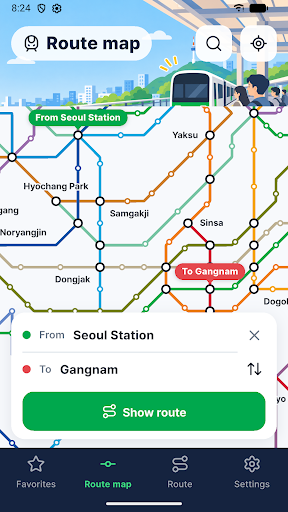
- Subway map, route search, and a home screen widget — zoom the full map, tap any station for arrivals, search fastest or fewest-transfer routes, and keep one trip visible on your home screen without opening the app.
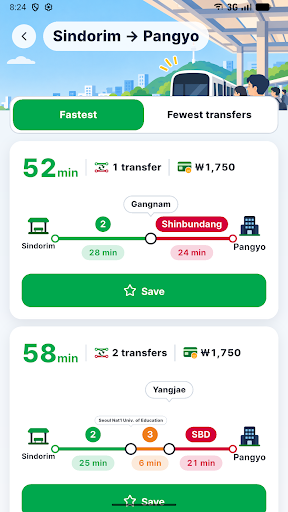
This one is built specifically around Seoul’s subway system and its public arrival data, so it’s most useful if you’re actually riding those lines — commuting into Seoul for work or school, running the same errand route every week, or just someone who’s lived here long enough to have a “usual trip.” The original Korean listing calls it 지하철 핀 (roughly “subway pin”), which is a decent description of what the app does: it pins your trip so you stop searching for it.
Subway Pins also comes in English and Korean, with light and dark themes and a larger text option, plus the ability to export and import your saved trips if you switch phones. If Seoul’s subway is part of your daily routine, give it a try on Google Play and let me know what you think.
Play Store에서 다운로드: Subway Pins: Seoul Metro Times
Official page: reactiveworks.dev/apps/subwaypin
Update history: ahngo13.github.io